Integrating the Paper Cut Christmas Village SVG Bundle into Your Holiday Workflow
The holiday season often brings a surge of creative projects, from handmade gifts to seasonal home decor. For crafters, designers, and small business owners, managing this influx requires more than just inspiration; it demands efficient tools and reliable assets. The Paper Cut Christmas Village SVG Bundle serves as a foundational resource in this process, bridging the gap between conceptual design and tangible output. By understanding how to integrate this asset into your existing workflow, you can streamline production, maintain high quality, and reduce the stress often associated with peak creative periods.
Understanding the Asset and Its Role in Design Planning
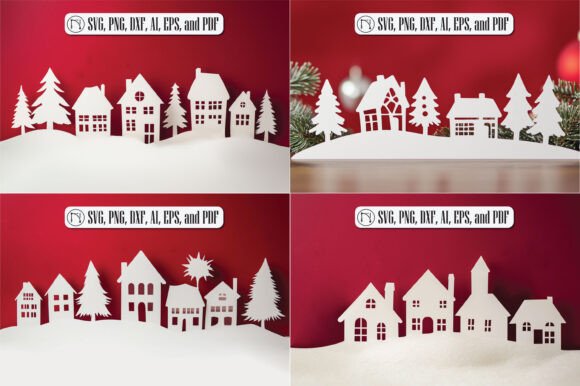
Before launching any cutting project, preparation is key. The Paper Cut Christmas Village SVG Bundle is not merely a single image but a comprehensive collection of vector files designed for precision cutting. It features intricate details such as cozy cottages, snow-covered trees, and festive decorations, all structured to work seamlessly with layering techniques. Recognizing the complexity of these designs helps in planning material usage and time allocation.
In the initial planning phase, assess the scope of your project. Are you creating a single shadow box for personal enjoyment, or are you producing a batch of holiday cards for clients? The bundle’s versatility allows it to fit both scenarios. However, the detailed nature of paper cut art means that material selection becomes critical during this stage. Thin cardstock may tear under intricate cuts, while heavier stock might require multiple passes. By reviewing the file contents early, you can align your material purchases with the technical requirements of the design, avoiding mid-project delays.
Compatibility and Technical Setup
A smooth workflow depends heavily on software and hardware compatibility. This bundle includes multiple formats—SVG, PNG, DXF, AI, EPS, and PDF—ensuring it integrates with a wide range of cutting machines and design software. Whether you use Cricut Design Space, Silhouette Studio, Adobe Illustrator, or CorelDRAW, having the right file format prevents conversion errors and loss of detail.
- SVG: Ideal for web-based cutting software like Cricut Design Space, preserving vector paths for clean cuts.
- DXF: Best suited for Silhouette Studio Basic Edition, which does not support SVG imports without an upgrade.
- AI/EPS: Perfect for professional designers using Adobe Illustrator who need to edit anchor points or combine elements with other vector assets.
- PNG: Useful for sublimation printing or digital mockups where cutting is not required.
Organizing these files before starting your project saves significant time. Create a dedicated folder on your computer or cloud storage specifically for holiday assets. Subdivide this folder by file type or project phase. This organizational habit ensures that when you are in the flow of creation, you are not searching for the correct version of a file, thereby maintaining momentum and reducing frustration.
Implementation Strategies for Different User Profiles
The way you utilize the Paper Cut Christmas Village SVG Bundle will vary depending on your role and goals. Here is how different users can integrate this resource effectively:
For Hobbyists and DIY Enthusiasts
If you are crafting for personal joy or family gifts, focus on the experiential aspect of the process. Start with a smaller section of the village to test your machine’s settings. Use scrap paper to dial in blade depth and pressure. Once satisfied, move to your final material. Consider using the bundle to create layered shadow boxes. This technique involves stacking multiple layers of cardstock with foam tape in between to create depth. The bundle’s design is optimized for this, with distinct foreground and background elements that separate cleanly. Take your time with weeding—the process of removing excess material—as the intricate details define the final aesthetic.
For Small Business Owners and Entrepreneurs
For those selling handmade goods, efficiency and consistency are paramount. The bundle allows for scalable production. You can standardize your product offering by creating a signature "Winter Village" card or decor piece. To maintain quality control, create a checklist for each unit produced: check for clean cuts, ensure proper alignment of layers, and verify packaging integrity. Since the files are vector-based, you can resize them without losing quality, allowing you to offer different product sizes from the same asset. This flexibility maximizes the return on investment for the digital purchase.
For Educators and Workshop Leaders
Educators can use this bundle to teach principles of design, spatial awareness, and patience. Break the project into manageable steps for students. First, discuss the concept of layering and depth. Then, guide them through the technical process of importing the SVG and setting up the cut. The inclusive nature of the design, with its recognizable holiday motifs, engages participants of various skill levels. It also provides an opportunity to discuss file formats and why vector graphics are preferred for cutting over raster images.
Enhancing Quality Through Material and Tool Selection
The success of a paper cut project relies heavily on the interaction between the digital file and physical materials. While the Paper Cut Christmas Village SVG Bundle provides the blueprint, the execution depends on your choices. Use high-quality, acid-free cardstock to ensure longevity, especially if the item is intended as a keepsake. Colors should be chosen to enhance the contrast between layers; traditional reds and greens work well, but modern palettes like icy blues and silvers can offer a fresh take on the winter theme.
Tool maintenance is another often-overlooked aspect of workflow. A dull blade can drag paper, causing tears in the delicate bridges of the village design. Regularly inspect and replace blades. Additionally, use a strong grip mat for lighter papers to prevent shifting during the cut. These small adjustments in your physical setup directly impact the fidelity of the digital design when translated into reality.
Long-Term Value and Asset Management
Investing in digital assets like this bundle is not a one-time transaction but a long-term addition to your creative library. Unlike physical supplies that deplete, digital files can be reused indefinitely. Over time, you can build a portfolio of variations using the same base file. For instance, one year you might create a traditional look, and the next, a minimalist monochrome version. This adaptability makes the bundle a cost-effective resource for recurring seasonal campaigns.
Furthermore, keeping track of which projects yielded the best results helps refine future workflows. Note down settings that worked well for specific materials. This documentation creates a personal knowledge base, reducing trial and error in subsequent years. As you become more familiar with the nuances of the design, you may even begin to modify the SVG files themselves, adding custom text or combining elements from other bundles to create unique compositions.
Final Thoughts on Integration
Integrating the Paper Cut Christmas Village SVG Bundle into your holiday routine is about more than just cutting paper. It is about establishing a reliable process that supports creativity without being hindered by technical issues. By preparing your files, selecting appropriate materials, and tailoring the approach to your specific needs, you transform a digital download into a tangible expression of the holiday spirit. Whether you are a beginner looking for a rewarding project or an experienced creator aiming for efficiency, this tool offers the structure and beauty needed to elevate your seasonal crafts.
Remember that the goal is to enjoy the process as much as the result. Allow yourself the time to experiment with layers and colors. The intricate design of the village invites careful attention, turning the act of creation into a mindful practice. With the right preparation and mindset, this bundle becomes an indispensable part of your holiday toolkit, enabling you to produce work that is both professionally polished and personally meaningful.