Mastering the PSD Sweet Text Effect in Peach Fuzz: A Beginner’s Guide to 3D Design
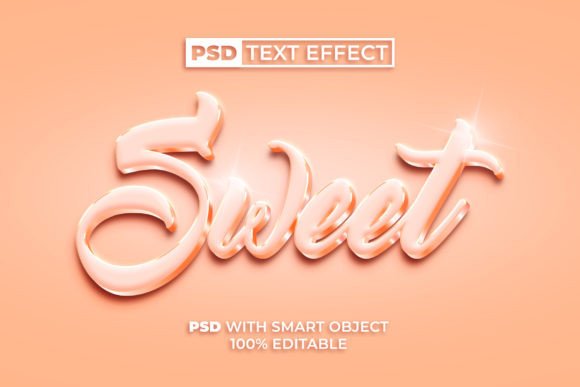
In the fast-paced world of digital design, visual appeal is paramount. Whether you are crafting a social media post, designing a logo for a new startup, or creating eye-catching headers for a website, typography plays a crucial role in communication. Recently, the design community has been captivated by soft, inviting aesthetics, with the Peach Fuzz color taking center stage. This warm, velvety hue offers a sense of tranquility and modernity. When combined with a PSD Sweet Text Effect, it creates a powerful visual tool that is both trendy and highly functional.
For many designers, especially beginners, achieving professional-grade 3D text effects can seem daunting. It often requires advanced knowledge of lighting, shading, and complex layer styles in Adobe Photoshop. However, technology has bridged this gap through the use of Smart Objects. This article explores how the PSD Sweet Text Effect in 3D Peach Fuzz Color Style transforms complex design tasks into simple, one-click actions, making high-quality design accessible to everyone.
Understanding the Power of Smart Objects in Photoshop
To truly appreciate the value of this specific text effect template, one must first understand the underlying technology: the Smart Object. In traditional Photoshop workflows, editing text within a heavily styled layer can be destructive. If you rasterize a layer to apply certain filters, you lose the ability to edit the text content later. This is where Smart Objects revolutionize the process.
A Smart Object acts as a container that preserves an image's source content with all its original characteristics. When you use a PSD file equipped with Smart Object functionality for text effects, you are not just editing pixels; you are interacting with a dynamic link. By double-clicking the Smart Object layer, a new window opens containing the raw text. You simply type your desired words, save the file, and the main document automatically updates with the new text, fully wrapped in the complex 3D Peach Fuzz styling. This non-destructive workflow ensures that your design remains flexible and editable at any stage.
Why Peach Fuzz? The Significance of Color Trends
Color is not merely decorative; it communicates emotion and brand identity. Peach Fuzz, a soft shade between pink and orange, has gained significant traction in modern design for its ability to evoke feelings of warmth, care, and community. Unlike stark whites or aggressive reds, Peach Fuzz is approachable. It fits seamlessly into lifestyles that prioritize well-being and mindfulness.
When applied to a 3D text effect, this color gains depth and dimension. The "Sweet" aspect of the text effect refers to the soft, rounded, and often glossy finish that mimics candy or smooth plastic. This combination makes the text feel tactile and inviting. For businesses in the beauty, wellness, food, or lifestyle sectors, using a 3D Peach Fuzz Color Style can instantly align their visual identity with current consumer preferences for softness and authenticity.
Practical Applications in Modern Work and Creativity
The utility of a pre-made PSD text effect extends far beyond simple hobbyist projects. In professional environments, time is a critical resource. Here is how this tool integrates into various aspects of modern work:
- Social Media Marketing: Brands need consistent, high-quality visuals daily. Using a one-click text effect allows social media managers to create cohesive story highlights or post captions without hiring a graphic designer for every minor update.
- Logo Design Prototyping: While final logos are often vector-based, presenting concepts in 3D can help clients visualize the brand in real-world applications. The 100% editable nature of these files allows designers to rapidly iterate through different brand names.
- Educational Materials: Teachers and content creators can use these engaging text styles to make presentations and educational videos more visually stimulating for students.
The key advantage here is the no skill requirement aspect. You do not need to understand how to map a bevel and emboss layer style or how to calculate drop shadow distances. The template has already done the heavy lifting. This democratization of design tools means that small business owners, bloggers, and educators can produce professional-looking graphics independently.
Step-by-Step: How to Use the Template
Using this PSD Sweet Text Effect is designed to be intuitive. Even if you have never opened Photoshop before, the process is straightforward. Here is a logical breakdown of how to utilize the file effectively:
- Open the PSD File: Launch Adobe Photoshop and open the downloaded PSD file. You will see the preview of the 3D Peach Fuzz text.
- Locate the Smart Object: In the Layers panel, look for the layer named "Your Text" or similar, which will have a small icon in the corner indicating it is a Smart Object.
- Edit the Content: Double-click the thumbnail of this Smart Object layer. A new tab will open. Delete the placeholder text and type your own message.
- Save and Update: Press Ctrl + S (or Command + S on Mac) to save the changes. Close the tab and return to the main document. You will see your new text instantly rendered in the 3D Peach Fuzz style.
- Export: Once satisfied, you can save the final image as a JPEG or PNG for web use. The package typically includes a JPEG file for quick reference, but the PSD allows for full customization.
This process highlights the efficiency of modern design assets. What used to take hours of manual adjustment now takes seconds. The inclusion of a Readme txt file in the download further assists users by providing specific instructions and font links, ensuring a smooth experience.
Common Misunderstandings About Pre-Made Effects
Despite their benefits, there are misconceptions about using templates like the PSD Sweet Text Effect. Some purists argue that using pre-made effects stifles creativity. However, this view overlooks the strategic value of such tools. Templates are not replacements for creative thinking; they are accelerators. They handle the technical execution, freeing the designer to focus on composition, messaging, and overall aesthetic harmony.
Another common assumption is that these files are rigid. In reality, a high-quality PSD is 100% editable. Beyond just changing the text, users can often adjust the hue of the Peach Fuzz color to match specific brand guidelines, modify the background, or tweak the intensity of the 3D shadows. The "free font used" feature ensures that you do not need to purchase expensive licenses to achieve the look, removing another barrier to entry.
Enhancing Your Design Workflow
Integrating tools like the 3D Peach Fuzz Text Effect into your workflow can significantly boost productivity. It allows for rapid prototyping and experimentation. For instance, if you are unsure whether a bold sans-serif or a playful script works better with the 3D effect, you can test both in minutes. This agility is crucial in today’s digital landscape, where trends shift quickly and the demand for fresh content is constant.
Moreover, the consistency provided by a single template helps in building a recognizable brand voice. If all your promotional materials use the same distinctive 3D style and color palette, your audience begins to associate that visual language with your brand. This is a fundamental principle of branding that is often difficult for beginners to maintain without standardized assets.
Conclusion
The PSD Sweet Text Effect Peach Fuzz Color is more than just a stylish graphic asset; it is a testament to how technology can simplify complex creative processes. By leveraging the power of Smart Objects, this tool removes the technical barriers associated with 3D typography, making it accessible to users of all skill levels. Whether you are a seasoned designer looking to speed up your workflow or a beginner eager to create professional-looking designs, this template offers a perfect blend of ease and quality.
As we continue to navigate a visually driven digital world, tools that combine aesthetic appeal with user-friendly functionality will remain indispensable. The soft, inviting nature of Peach Fuzz, combined with the tangible depth of 3D design, provides a versatile solution for modern communication needs. If you have any questions about using this effect or need further assistance, feel free to contact the creator. Embrace the simplicity, explore your creativity, and let your text stand out with sweetness and style.
Thank you for reading. We hope this guide helps you unlock the full potential of your design projects.