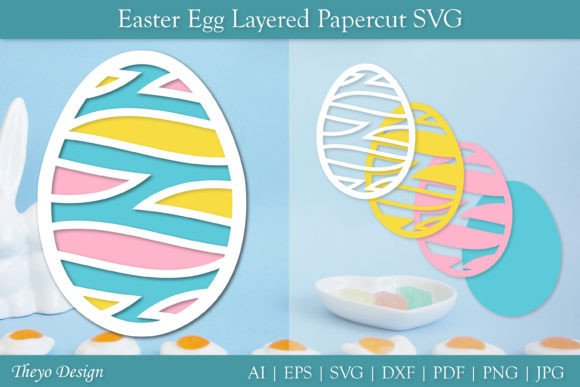
Mastering the Easter Egg Layered Papercut SVG for Flawless Craft Projects
The arrival of spring brings a surge of creativity, and few projects capture the festive spirit quite like intricate paper art. For crafters using digital cutting machines, the Easter Egg Layered Papercut SVG has become a staple design choice. These files are not merely simple outlines; they are complex, multi-dimensional templates designed to create stunning shadow box effects or delicate wall hangings. However, diving into layered papercraft without understanding the technical nuances can lead to frustration, wasted materials, and disappointing results. Whether you are a seasoned professional selling on Etsy or a hobbyist decorating your home, understanding how to properly handle these digital assets is crucial for success.
Understanding the Complexity of Layered Designs
At its core, an Easter Egg Layered Papercut SVG is a collection of vector paths arranged in specific strata. When cut and assembled, these layers create depth and visual interest. The appeal lies in the transformation of flat cardstock into a three-dimensional piece of art. Yet, many beginners mistakenly assume that downloading the file is the hardest part. In reality, the preparation and assembly require precision. A common misunderstanding is that all SVGs are created equal. Some files are optimized for speed, while others prioritize intricate detail. Choosing the wrong type for your machine’s capabilities or your skill level can result in tears, jagged edges, and hours of unnecessary weeding.
When you purchase a premium package, you typically receive a ZIP file containing multiple formats: AI, PDF, EPS, JPG, PNG, SVG, and DXF. This variety is not just for show; each format serves a specific purpose. Ignoring this versatility is a frequent oversight. For instance, using a PNG for a cutting machine will result in a pixelated edge, whereas the SVG ensures crisp, scalable vectors. Understanding which file type aligns with your software—whether it is Silhouette Studio, Cricut Design Space, or Adobe Illustrator—is the first step toward a professional finish.
Common Pitfalls in File Selection and Preparation
One of the most significant errors crafters make is neglecting to check the layer organization before sending the design to the cutter. A well-designed Easter Egg Layered Papercut SVG should have clearly defined layers. If the layers are merged or improperly grouped, you may find yourself cutting through multiple sheets at once or struggling to identify which piece belongs where. This mistake directly impacts efficiency and material cost. Always open the file in your preferred design software first. Inspect the color coding or layer names. If the file appears chaotic, take the time to separate and label the layers manually. This upfront investment saves considerable time during the assembly phase.
Another critical area where mistakes occur is in the choice of material. Layered papercuts rely on contrast and shadow. Using paper that is too thick can make folding and adhering difficult, while paper that is too thin may tear during the weeding process. Many users overlook the importance of testing cuts. Before committing to your final expensive cardstock, perform a test cut on a scrap piece of similar weight. Adjust your blade depth and pressure settings accordingly. This simple step prevents the heartbreak of ruining a perfect sheet of paper due to incorrect machine settings.
Navigating the Assembly Process
Assembly is where the magic happens, but it is also where patience is tested. A frequent error is rushing the gluing process. Using too much adhesive can cause the paper to warp or bleed through, ruining the clean lines of the design. Conversely, using too little glue leads to layers shifting over time. The best approach is to use a fine-tip applicator or a spray adhesive for even coverage. Start from the center layer and work your way outwards, ensuring each piece is perfectly aligned before pressing it down. Using tweezers can help position small, intricate details without smudging the glue with your fingers.
Furthermore, many crafters forget to consider the background. The Easter Egg Layered Papercut SVG is often designed to be mounted on a contrasting backing board. Choosing a background color that clashes with the layers can diminish the visual impact. Take a moment to lay out your layers on different colored papers before gluing. This visual check allows you to experiment with combinations and choose the one that offers the best depth and readability. It is a small step that significantly enhances the final presentation.
Maximizing Value from Your Digital Purchase
When you buy a digital product, you are investing in potential. To maximize this value, ensure you understand the license terms. Most creators allow personal use and small commercial use, but restrictions vary. Misunderstanding these terms can lead to legal issues if you plan to sell your finished products. Always read the included documentation. If something is unclear, do not hesitate to ask. Reputable sellers encourage questions and are happy to clarify usage rights. This open communication fosters trust and ensures you can use your Easter Egg Layered Papercut SVG confidently in your business or personal projects.
Additionally, keep your files organized. After downloading the ZIP file, extract it immediately and store the formats in a dedicated folder. Label the folder with the project name and date. This practice makes it easy to revisit the design later for modifications or reprints. Losing track of digital assets is a common frustration that can be easily avoided with a systematic approach to file management.
Making the Right Choice for Your Needs
Before making a purchase, evaluate the complexity of the design against your available time and tools. If you are new to layered papercraft, start with designs that have fewer layers and larger shapes. As you gain confidence, you can progress to more intricate Easter Egg Layered Papercut SVG files with finer details. Check reviews or previews if available. Look for comments regarding ease of weeding and clarity of instructions. These insights from other users can guide you toward products that match your skill level.
Remember, quality matters. A poorly constructed SVG with overlapping paths or non-closed shapes will cause your cutting machine to behave erratically. Investing in high-quality files from reputable designers ensures a smoother experience. These designers spend hours refining their vectors to ensure compatibility across various platforms. Supporting these creators not only gives you a better product but also encourages the development of more innovative designs in the future.
In conclusion, working with layered papercut designs is a rewarding endeavor that blends technology with traditional craftsmanship. By avoiding common mistakes in file handling, material selection, and assembly, you can achieve professional-quality results. Take the time to prepare, respect the intricacy of the design, and enjoy the creative process. If you encounter any issues or have questions about your download, reach out to the seller. Most are eager to help you succeed. With the right approach, your next Easter decoration will be a masterpiece that stands out for all the right reasons.