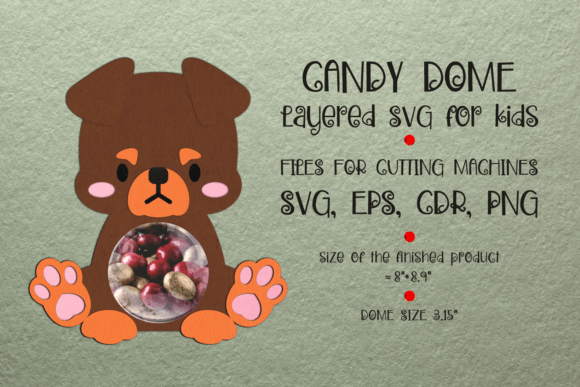
Mastering the Rottweiler Dog Candy Dome Template for Flawless Paper Crafts
Crafting is often seen as a relaxing hobby, but anyone who has spent hours assembling a complex paper model only to find the pieces do not align knows the frustration of poor preparation. The Rottweiler Dog Candy Dome Template offers a charming solution for creating unique party favors, gift holders, or decorative centerpieces. However, the difference between a professional-looking finished product and a crumpled mess lies entirely in how you handle the digital files before you ever pick up your scissors or heat up your cutting machine.
This digital product is designed to simplify the creation of a three-dimensional sucker holder shaped like an adorable Rottweiler. While the concept is straightforward, the execution requires attention to detail. Many creators rush into the cutting phase without understanding the specific requirements of the file formats provided. By taking a moment to understand the technical aspects of this download, you can save time, reduce material waste, and ensure your final craft looks polished and precise.
Understanding the File Formats and Software Requirements
One of the most common misunderstandings among beginners is assuming that all digital design files work interchangeably with every software program. When you download the Rottweiler Dog Candy Dome Template, you receive a package containing CDR, EPS, SVG, and PNG preview files. Each of these serves a distinct purpose, and using the wrong one can lead to significant headaches.
The SVG (Scalable Vector Graphics) file is typically the go-to for users of browser-based cutting software like Cricut Design Space or Silhouette Studio Basic Edition. However, if you are a professional designer using CorelDRAW or Adobe Illustrator, the CDR and EPS files will provide you with editable vector paths that maintain their quality at any size. The PNG is merely a preview image; it cannot be used for cutting because it lacks the vector data necessary for your machine to follow cut lines.
A frequent mistake is attempting to upload the PNG file into a cutting machine software, expecting it to auto-detect cut lines. This results in jagged edges and inaccurate shapes. Always ensure you have the appropriate software installed to open the specific file format you intend to use. If you are unsure, the SVG is generally the safest bet for most hobbyist cutting machines, provided you know how to manipulate layers within your software.
The Critical Step: Managing Layers in Design Space
For those using Cricut Design Space, there is a specific technical hurdle that trips up many users. The template includes two separate layers: one for printing the colorful design and another for the cut lines. If you simply upload the SVG and hit "Make," the machine may attempt to cut the printed image incorrectly or fail to recognize where the fold lines and cut boundaries are.
To avoid this, you must manually adjust the layer settings. After uploading the SVG file, look for the lowest layer and the layer containing the dotted line for the circle cut-out. You need to select both of these layers and click the Attach button. This action tells the software to keep these elements in their exact relative positions during the cutting process. Without attaching them, the software might rearrange the pieces to save material, which destroys the alignment between the printed graphic and the physical cut shape. This small step is crucial for ensuring that the Rottweiler’s features align perfectly with the dome structure.
Material Selection and Printing Quality
Another area where creators often cut corners is paper weight. Because this template creates a three-dimensional dome that needs to hold a candy sucker, standard printer paper is usually too flimsy. It may tear during assembly or fail to support the weight of the treat, causing the dome to collapse. Conversely, using cardstock that is too thick can make folding along the score lines difficult and result in cracked edges.
The ideal approach is to use high-quality cardstock, typically between 65lb and 80lb weight. This provides enough rigidity to hold the shape while remaining flexible enough for clean folds. Additionally, ensure your printer settings are adjusted for "Cardstock" or "Heavy Paper" to prevent ink smudging. Smudged ink on the Rottweiler’s face can ruin the aesthetic appeal of the final product, making it look amateurish despite your best efforts in cutting and assembly.
Assembly Techniques for a Professional Finish
Even with perfect cuts and prints, poor assembly can undermine your hard work. A common error is using too much adhesive, which can seep out from the seams and create visible stains on the exterior of the dome. Instead, use a fine-tip glue pen or double-sided tape for cleaner application. Apply adhesive sparingly to the tabs indicated in the template, and allow a few seconds for the glue to become tacky before pressing the pieces together.
Patience is key when forming the dome. Rushing the folding process can lead to creases in unwanted areas. Take your time to pre-fold along all score lines using a bone folder or the back of a butter knife. This prepares the paper fibers for bending and ensures sharp, crisp edges. When inserting the sucker, ensure the stick is centered to maintain the balance of the dome. If the hole for the sucker seems too tight, gently widen it with a pencil rather than forcing the stick through, which could tear the paper.
Maximizing the Value of Your Digital Purchase
When evaluating a digital product like the Rottweiler Dog Candy Dome Template, consider its versatility. This design is not limited to Halloween or dog-themed parties. With slight color adjustments in your design software, you can adapt the template for various occasions, such as birthdays, veterinary clinic giveaways, or pet adoption events. Understanding how to edit the vector files allows you to customize the colors to match specific brand guidelines or party themes.
Before finalizing your project, always do a test run with a single copy. Print and cut one unit to check the sizing and alignment. This practice helps you identify any potential issues with your printer calibration or software settings before committing to a large batch. It is far more cost-effective to troubleshoot one piece than to waste materials on dozens of flawed units.
By paying attention to file formats, layer management, material choice, and assembly techniques, you can transform a simple digital download into a stunning handmade item. The Rottweiler Dog Candy Dome Template is a powerful tool for creators, but its potential is only realized through careful and informed usage. Avoid the common pitfalls of rushed preparation, and you will consistently produce high-quality crafts that impress recipients and elevate your creative portfolio.