Stars Book Marks: 3D SVG Cutting Guide
Crafting physical bookmarks has evolved far beyond simple paper strips and glue. Today, digital cutting machines allow creators to produce intricate, layered designs that add depth and personality to reading accessories. The Stars Book Marks design set offers a modern approach to this classic craft, utilizing 3D layering techniques to create celestial-themed page holders that stand out. Whether you are a seasoned crafter or just unboxing your first cutting machine, understanding how to work with these specific files can elevate your projects from flat cutouts to textured art pieces.
This guide explores the practical aspects of using these star-themed designs, focusing on the technical benefits of the file format and how to achieve clean, professional results without the frustration of jagged edges or misaligned layers.
Understanding the 3D SVG Advantage
At its core, an SVG (Scalable Vector Graphic) is a file format that uses mathematical paths rather than pixels to define images. This means the design remains crisp and clear regardless of how much you resize it. For the Stars Book Marks, this scalability is crucial because it allows you to adjust the size of the stars to fit different book formats, from pocket-sized paperbacks to large hardcovers, without losing detail.
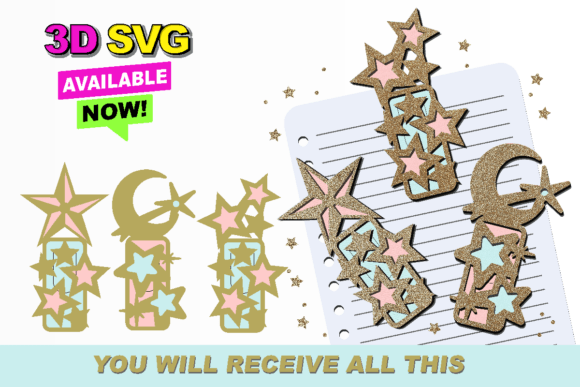
The "3D" aspect refers to the layering capability. Instead of a single flat shape, the design consists of multiple overlapping elements. When cut from different colored materials—such as cardstock, vinyl, or acetate—and stacked, they create a shadow effect that mimics depth. This visual trick adds a premium feel to what is otherwise a simple material cost. The primary value here is efficiency; the design is pre-structured to layer correctly, saving you hours of trial and error in figuring out which piece goes on top of another.
Seamless Integration with Cutting Software
One of the most significant hurdles for beginners is file compatibility. Many free graphics found online are raster images (like JPEGs or PNGs), which require manual tracing before they can be cut. This process often results in rough edges and lost details. The Stars Book Marks are provided as ready-to-cut SVGs, specifically optimized for popular platforms like Silhouette Studio and Cricut Design Space.
When you open these files in your preferred software, the cut lines are already defined. This eliminates the need for complex tracing settings or manual path creation. For users of Silhouette Studio, the layers will appear distinct, allowing you to assign different cut settings to each layer if necessary. Similarly, Cricut users will find that the "Attach" function works seamlessly, ensuring that the relative position of the stars remains intact when sent to the mat. This reliability means you spend less time troubleshooting software errors and more time creating.
Practical Applications Beyond Reading
While the primary function is obvious, the versatility of star-shaped cutouts extends into various creative and commercial avenues. Educators can use these designs to create reward systems for students, where each completed task earns a new layer for their bookmark. This gamifies reading and provides a tangible sense of progress.
For small business owners and Etsy sellers, these designs offer a low-cost, high-margin product opportunity. Because the files are digital, there is no inventory cost until a sale is made. You can market them as part of a "self-care bundle" alongside journals and pens, or offer customization services where clients choose specific color combinations to match their brand or personal aesthetic. The celestial theme is particularly popular for night-time reading clubs, astronomy enthusiasts, or fantasy genre fans.
In a corporate context, these bookmarks can serve as elegant promotional items. A company could brand the bottom layer with their logo while keeping the star layers neutral, creating a subtle yet memorable giveaway for conferences or client meetings. The professional finish achieved through precise SVG cutting reflects well on the brand’s attention to detail.
Material Selection and Layering Tips
To truly capitalize on the 3D effect, material choice is paramount. Standard cardstock works well for the base layers, providing rigidity so the bookmark does not bend easily inside a book. For the top layers, consider using translucent vellum or acetate. When light hits these materials, it creates a soft glow around the star shapes, enhancing the celestial theme.
- Cardstock: Use 65lb to 80lb weight for durability. Heavier paper may be too thick for multiple layers.
- Vinyl: Ideal for adding glossy accents or metallic touches to specific star points.
- Adhesive: Liquid glue or double-sided tape dots are preferable to spray adhesives, which can warp thin paper layers.
When assembling, start from the largest base layer and work your way up. Ensure each layer is completely dry before adding the next to prevent shifting. If you are using a dark background color for the base, lighter top layers will pop more dramatically, creating higher contrast and visibility.
Important Considerations for Users
Before diving into your project, there are a few technical details to keep in mind to ensure a smooth experience. The Stars Book Marks are delivered in a compressed folder. This is a standard practice to reduce download times and keep related files organized. You will need to extract or unzip the folder before accessing the SVG files. Most operating systems have built-in tools for this, but if you are unfamiliar with the process, a quick search for "how to unzip files on [your OS]" will provide step-by-step instructions.
Additionally, while these files are optimized for Silhouette and Cricut machines, users with other brands of cutters should verify compatibility. Not all machines read SVG metadata in the same way. It is advisable to import the file into your specific software and perform a test cut on scrap material first. This helps you confirm that the cut lines are recognized correctly and that the blade depth is appropriate for your chosen material.
Finally, remember that precision is key in 3D layering. If your machine’s blade is dull, it may drag the paper, causing slight shifts in the cut shape. These minor imperfections become noticeable when layers are stacked. Regularly checking your blade condition and performing test cuts can save you from wasting expensive materials.
Final Thoughts on Creative Precision
The Stars Book Marks represent more than just a digital file; they are a toolkit for creating tactile, visually appealing objects. By leveraging the precision of SVG formats and the ease of modern cutting software, creators can produce professional-grade items with minimal effort. Whether you are making gifts for friends, supplies for your classroom, or products for your online store, the key lies in understanding the interplay between digital design and physical material. With the right preparation and attention to detail, these celestial designs can bring a touch of magic to every page they mark.