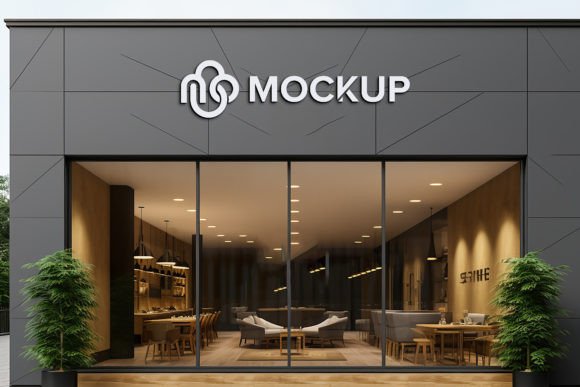
Store Sign Logo Mockup Template: A Practical Guide to Realistic Branding
Visualizing your brand in the real world is one of the most critical steps in establishing a professional identity. Whether you are a freelance graphic designer presenting to a client, a small business owner planning a storefront renovation, or a marketing specialist preparing a campaign, the gap between a flat digital file and a physical sign can be vast. This is where a Store Sign Logo Mockup Template becomes an indispensable tool. It bridges that gap by allowing you to place your design onto a photorealistic 3D environment, complete with accurate shadows, lighting, and perspective.
However, many users approach these templates with misconceptions that lead to wasted time or underwhelming results. Understanding how to properly utilize these resources ensures that your final presentation looks authentic and polished, rather than like a clumsy digital paste-up.
The Misconception of "Plug and Play" Perfection
A common mistake beginners make is assuming that using a smart object template requires zero attention to detail. While it is true that these tools are designed for ease of use—often requiring no advanced Photoshop skills—they are not magic wands. The primary feature of a high-quality mockup is the Smart Object Replacement. This allows you to double-click a layer, paste your logo, save, and see it automatically conform to the surface of the sign.
The error occurs when users ignore the context of their original design. If your logo has a transparent background but lacks proper contrast against the material of the sign (such as brushed metal, wood, or neon), the result will look flat. The mockup provides the lighting and shadows, but it cannot fix a low-resolution source file or a color palette that clashes with the environment. To avoid this, always ensure your source logo is vector-based or high-resolution PNG before inserting it into the smart object. This guarantees that when the template applies its distortion and lighting effects, the edges remain crisp and professional.
Overlooking Resolution and Print Readiness
Another frequent oversight involves resolution. Many creators download free or low-cost mockups that are optimized only for web viewing, typically at 72 DPI. While this might look fine on a smartphone screen, it fails miserably if you intend to use the image for large-format printing or high-end portfolio pieces. A premium Store Sign Logo Mockup Template should offer files at 300 DPI. This density is crucial for maintaining clarity when the image is scaled up or printed.
Before downloading or purchasing, check the file specifications. A pack that includes a PSD (Photoshop Document) and a high-quality JPG preview is standard, but the value lies in the layered structure. Ensure the layers are fully organized in folders. Disorganized layers can make editing a nightmare, especially if you need to adjust the color balance of the sign itself or tweak the background lighting to match your brand’s mood. Well-organized folders allow you to isolate specific elements, such as the glass reflection or the wall texture, giving you control over the final aesthetic without breaking the realistic effect.
Ignoring Lighting and Environmental Context
One of the most powerful aspects of a 3D realistic mockup is its ability to simulate real-world physics. The shadows and highlights are pre-rendered to match a specific light source. A major mistake users make is trying to force a design that contradicts this lighting. For example, placing a bright, glowing neon logo on a sign that is clearly lit by soft, natural daylight can create a visual dissonance that breaks the illusion of reality.
To correct this, take a moment to analyze the lighting direction in the template. Is the light coming from the left? Is it harsh sunlight or diffuse indoor lighting? Adjust your logo’s brightness and contrast slightly within the smart object to harmonize with these conditions. Some advanced templates allow you to edit the lighting intensity or color temperature. If yours does, use these features subtly. The goal is integration, not domination. Your logo should look like it belongs there, not like it was stamped on top after the fact.
Choosing the Right Style for Your Brand
Not all store signs are created equal, and neither are mockups. A sleek, minimalist tech startup will look out of place on a rustic, weathered wooden signboard, just as a vintage bakery logo might lose its charm on a sterile, modern acrylic display. Entrepreneurs and designers often choose a mockup based solely on its visual appeal rather than its relevance to their brand identity.
Before settling on a template, ask yourself: Does this material reflect my brand’s values? Is the setting appropriate for my target audience? If you are branding a luxury boutique, look for mockups featuring gold leaf, marble, or high-gloss finishes. For a craft brewery or artisanal shop, textured concrete or reclaimed wood might be more appropriate. Taking the time to match the mockup’s atmosphere with your brand’s personality enhances communication and makes the presentation more persuasive to clients or stakeholders.
Practical Steps for Better Results
To maximize the utility of your Store Sign Logo Mockup Template, follow these practical steps:
- Verify Compatibility: Ensure you have the correct version of Adobe Photoshop. Most smart object features require recent versions to function smoothly.
- Check Layer Organization: Open the PSD and browse the layer panel. Look for clear labels like "Replace Here," "Background," and "Shadows." Avoid files with merged layers that prevent customization.
- Test with Placeholders: Before finalizing your design, test the smart object with a simple shape or text. This helps you understand how the template handles distortion and perspective.
- Adjust Colors Globally: If the sign’s base color doesn’t match your brand, use adjustment layers (like Hue/Saturation) clipped to the sign layer. This maintains the texture and shadows while changing the hue.
- Export Correctly: Save your final image as a high-quality JPG for web use or a TIFF/PNG for print. Avoid compressing the file too much, as this can introduce artifacts that ruin the realistic look.
By avoiding these common pitfalls and approaching the tool with a critical eye, you transform a simple template into a powerful asset. The ease of editing and the lack of skill requirement are benefits, but they should not replace thoughtful design decisions. Remember, the mockup is a vessel for your creativity, not a substitute for it.
Ultimately, the goal is to create a visual that resonates. When a client or customer sees your logo on a realistic store sign, they should be able to imagine walking into that store. That emotional connection is what drives engagement and sales. So, take the time to choose wisely, edit carefully, and present confidently. And once you have created something you are proud of, don’t forget to rate the template creator—it helps the community maintain high standards for these useful resources.